PROJETO STACK
Pulse - SEO Inspector
Pulse - SEO Inspector
Couldn't load pickup availability
Inspect essential on-page SEO signals and receive prioritised recommendations from one clean browser extension.
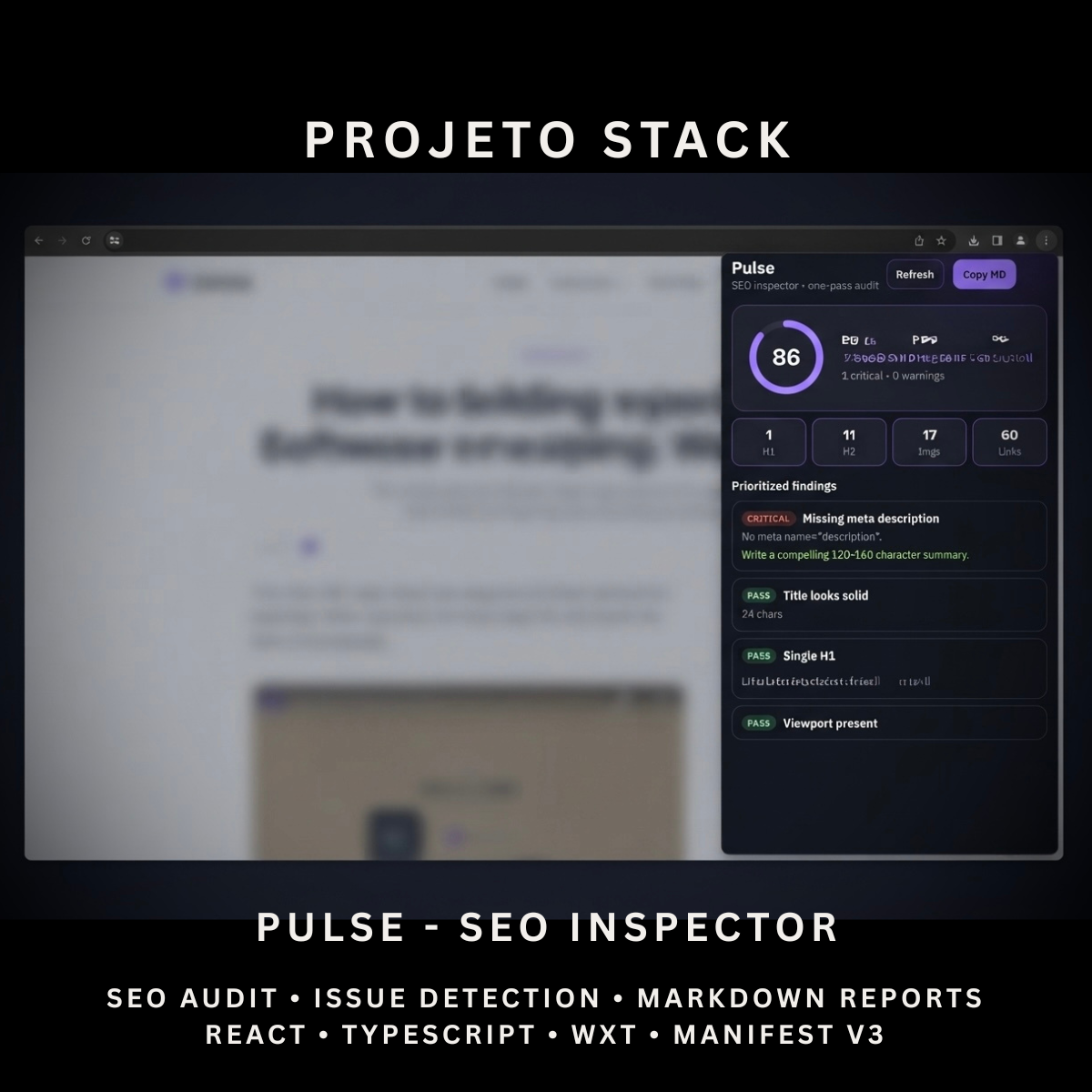
Pulse is a React and TypeScript SEO inspector featuring a 0–100 audit score, title and metadata checks, heading analysis, image-alt detection, link counts, Open Graph inspection, JSON-LD detection and Markdown report copying. It provides a complete source-code foundation for SEO tools, website-auditing products and client extension projects.
Perfect For
✓ SEO Professionals
✓ Web Developers
✓ Digital Marketers
✓ Content Managers
✓ Website Administrators
✓ Marketing Agencies
✓ QA Teams
✓ Website Auditing Tools
✓ Internal Business Applications
✓ Agency Client Projects
Why Choose Pulse?
✓ Generate a fast on-page SEO score
✓ Identify critical issues and warnings
✓ Review page titles and meta descriptions
✓ Inspect heading structure
✓ Detect images without alt text
✓ Check canonical and viewport metadata
✓ Detect Open Graph information
✓ Detect JSON-LD schema types
✓ Count internal and external links
✓ Copy audit reports as Markdown
✓ No third-party SEO service required
✓ Clean and organised source code
✓ Easy to customise and extend
✓ No recurring subscription fees
What’s Included
Your download includes:
📦 Complete React & TypeScript Source Code
📦 Chrome Manifest V3 Production Build
📦 Microsoft Edge-Compatible Build
📦 SEO Audit Popup Interface
📦 0–100 SEO Scoring System
📦 Prioritised Issue List
📦 Critical Issue Detection
📦 Warning Detection
📦 Informational Findings
📦 Successful Check Display
📦 Title Analysis
📦 Meta Description Analysis
📦 Heading Analysis
📦 Canonical Tag Detection
📦 Viewport Meta Detection
📦 HTML Language Detection
📦 Robots Meta Detection
📦 Image Alt Analysis
📦 Internal & External Link Counting
📦 Open Graph Detection
📦 Twitter Card Detection
📦 JSON-LD Schema-Type Detection
📦 Markdown Report Generator
📦 Background Service Worker
📦 Runtime Content Script
📦 Extension Icons & Assets
📦 WXT Configuration
📦 TypeScript Configuration
📦 Package Configuration
📄 Documentation (README.md)
Key Features
✓ Automatic Active-Page Audit
✓ Manual Audit Refresh
✓ SEO Score From 0 to 100
✓ Critical Issue Count
✓ Warning Count
✓ Prioritised Findings
✓ Recommended Fixes
✓ Page Title Detection
✓ Title Length Measurement
✓ Missing Title Detection
✓ Short Title Warning
✓ Long Title Warning
✓ Meta Description Detection
✓ Description Length Measurement
✓ Missing Description Detection
✓ Short Description Warning
✓ Long Description Warning
✓ H1 Detection
✓ Multiple H1 Warning
✓ H2 Count
✓ H3 Count
✓ Canonical URL Detection
✓ Viewport Meta Detection
✓ HTML Language Detection
✓ Robots Meta Detection
✓ Noindex Detection
✓ Total Image Count
✓ Missing Image Alt Detection
✓ Internal Link Count
✓ External Link Count
✓ Open Graph Title Detection
✓ Open Graph Description Detection
✓ Open Graph Image Detection
✓ Twitter Card Detection
✓ JSON-LD Detection
✓ Schema Type Extraction
✓ Page URL Display
✓ Markdown Report Copying
Technology Stack
Built using modern browser-extension technologies:
✓ React 19
✓ TypeScript
✓ WXT
✓ Manifest V3
✓ Browser Tabs API
✓ Browser Scripting API
✓ Browser Runtime Messaging
✓ Clipboard API
✓ DOM Query APIs
✓ Native URL API
✓ Native JSON Parsing
✓ Component-Based Architecture
✓ Modern CSS
✓ Modern Folder Structure
Performance Features
Designed for fast on-page inspections:
✓ Single-Pass DOM Collection
✓ Local SEO Analysis
✓ No External API Requests
✓ No Remote Audit Server
✓ Runtime Content-Script Injection
✓ Automatic Audit on Popup Open
✓ Lightweight Popup Interface
✓ Client-Side Score Calculation
✓ Deduplicated Schema Types
✓ Limited Data Collection
✓ Prioritised Issue Sorting
✓ Reusable React Components
✓ Clean TypeScript Implementation
✓ Modern Manifest V3 Architecture
✓ Easy Branding Customisation
✓ Scalable Source-Code Structure
How It Works
- Download and extract the project files.
- Install the project dependencies.
- Run the development environment or generate a production build.
- Load the generated extension folder into your browser.
- Open a standard webpage you want to inspect.
- Open Pulse from the browser toolbar.
- Allow the extension to analyse the active page.
- Review the SEO score, critical issues, warnings and successful checks.
- Follow the displayed recommendations to improve the page.
- Copy the completed report as Markdown when needed.
- Customise the branding, score rules, recommendations, interface and icons.
- Build and publish the completed extension when ready.
Browser Compatibility
Verified for:
✓ Google Chrome
Compatibility with the following may be possible after testing:
✓ Microsoft Edge
✓ Brave
✓ Opera
Firefox and Safari compatibility are not included or verified in the uploaded package.
License
Your purchase includes:
✓ Lifetime access to the purchased source code
✓ Commercial use for personal and client projects
✓ Full customisation rights
✓ Unlimited personal and client projects
You may not:
✗ Resell the original source code
✗ Redistribute the files
✗ Share the files publicly
✗ Repackage the source code as a competing digital product for resale
Instant Digital Download
No physical product will be shipped.
Immediately after purchase, you’ll receive instant access to download the complete SEO-inspector source code, Chrome production build and documentation so you can begin creating your own browser SEO tool.
Important Note
Pulse provides a fast, custom on-page SEO assessment based on checks defined inside the source code.
The displayed score is not:
✗ A Google Ranking Score
✗ A Google Lighthouse Score
✗ A Search Console Score
✗ A Guarantee of Search Rankings
Pulse analyses the active webpage only. It does not include:
✗ Complete Website Crawling
✗ Page-Speed Testing
✗ Core Web Vitals
✗ Keyword-Ranking Tracking
✗ Backlink Analysis
✗ Broken-Link Testing
✗ XML Sitemap Auditing
✗ robots.txt Auditing
✗ Search-Engine Indexing Checks
✗ Schema Validation
✗ Cloud Report Storage
✗ Browser Marketplace Publication
Some webpages may block extension scripts or restrict inspection, including browser settings pages, extension marketplaces and internal browser URLs.
PROJETO STACK - Premium software templates and digital products built for modern businesses.
Share